External links
External links point to domains different from the project domain, including any of its subdomains. If you are working on a project for www.example.com, blog.example.com is considered external to it (in addition to any other domain). Content seen as an external link will be collected and listed (and all external domains seen will be listed on the Discovery screen) in this menu.
Each of these references can be localized, which means changing it to point to a different resource for the target language (which must be provided externally in the same format as the original). The proxy will replace the given external link automatically in each language where an alternative is provided.
You can start from either Discovery > External links or Content > External links.
- select a language in the left side dropdown into which to localize.
- click on “Select” in the hover menu of a link to start the localization process. Alternatively, if you have already clicked on the link and the localization frame is active, click on the “Mark this external link as localizable”.
- input the external link that you want to use.
- click on “Set link”.
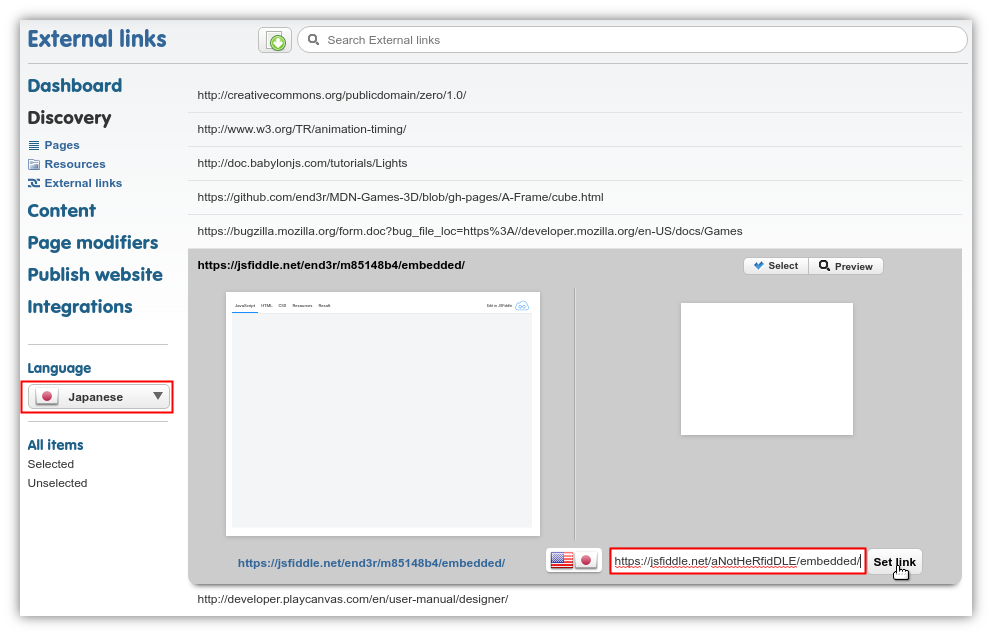
Embedded videos are frequent targets of such external link localization.
This feature is not meant to create gateways between two separately translated projects. To integrate references between projects in a consistent and seamless manner, use project linking.